Notifications you receive
Who can do this: every user (viewer, operator, organization administrator) can receive notifications and controls their own channels and schedules on their profile page. Organization administrators choose each service's notification group and notification settings.
Pulse sends notifications by email and by SMS. This page explains who receives them, what triggers them, what stops them, and exactly what the messages say.
Channels
| Channel | Details |
|---|---|
Sent from pulse@labmonitors.com. One message is sent per notification for the whole group; recipients are blind-copied, so you do not see who else received it. Plain text. |
|
| SMS | Sent from the Pulse SMS gateway. One text per recipient, on a single line, plain characters only, up to 300 characters. Every text ends with Reply XXXX to acknowledge, where XXXX is a 4-character code (see Acknowledging alarms). Your phone number must be on your profile in international format, for example +16045551234. |
Who receives a notification
Recipients are resolved in three steps every time a notification is sent:
- The service's notification group. Each service has one Notification group, chosen by an organization administrator in the service's edit panel. A service with no notification group never sends any notification of any kind, on either channel. Organization administrators can see the group on the service page as "🔔 Notifies group: …".
- The group's members. Every active user in that group is a candidate. See Users and groups.
- Each member's own settings on their profile page, checked separately for each channel:
| Channel | Switch on your profile | Default | Also needs |
|---|---|---|---|
| Email notifications enabled | on | An email address (always present). Your Email notification schedule must allow delivery now. | |
| SMS | SMS notifications enabled | off | A phone number in Phone (for SMS). Your SMS notification schedule must allow delivery now. |
The same group feeds both channels. A member can receive email only, SMS only, both, or neither.
Notification schedules
Each channel has its own schedule on your profile: one checkbox per weekday with a start and end time in 24-hour format. Schedules are evaluated in your profile timezone as it was when you saved the schedule.
- A checked day delivers only between the start and end time, inclusive. A start time later than the end time is an overnight window, for example 22:00 to 06:00.
- An unchecked day delivers nothing on that channel that day, as long as at least one other day is checked.
- All days unchecked places no restriction at all; it behaves like every day 00:00 to 23:59. To stop a channel entirely, clear its … notifications enabled box instead.
Schedules do not queue notifications
Your schedule is checked at the moment each notification is sent; nothing is held for you until your window opens.
- If at least one member of the group is inside their window, the notification is sent to them and counts as sent. You do not receive the initial alarm notification. If the alarm is still active when your window opens, you receive the next repeat (see below).
- If no member is inside a window, Pulse keeps trying every minute until someone's window opens. That person receives the initial notification then.
- One-off notifications (acknowledged, recovered, stale, data recovered) that fall outside your window are delivered to the members who are inside theirs; you do not receive them later.
What triggers a notification
Pulse checks every service once a minute. Each notification type has its own trigger and its own on/off setting in the service's edit panel.
| Notification | Sent when | Service setting | Timing |
|---|---|---|---|
| Alarm | A channel of the service enters WARNING or CRITICAL. | Send warning / Send critical | After the band's Delay (min), on the next once-a-minute check. |
| Alarm (escalation) | The severity changes between WARNING and CRITICAL while the alarm is active. | Send warning / Send critical | A fresh alarm notification at the new severity, after that band's Delay (min). A WARNING acknowledgement does not stop the CRITICAL one. |
| Repeat | The alarm is still active. | Send warning / Send critical | Every Repeat interval (minutes) after the previous alarm or repeat notification. |
| Acknowledged | Someone acknowledges the alarm, from Pulse or by SMS reply. | Send acknowledgements | Next check, within about a minute. |
| Recovered | The service returns to NORMAL and an alarm or repeat notification was sent for that episode. An episode that recovered before anyone was notified sends nothing. | Send recoveries | Next check. |
| Stale | No data has arrived for the service's stale threshold (twice the device's uplink interval, or Stale after (minutes) when no interval has been sent; see The stale threshold), or a companion setpoint is unavailable. | Enable system notifications (STALE / device offline alerts) — off by default | System notification delay (minutes) (default 5) after the channel is marked stale, so about the stale threshold + delay, plus up to two minutes. |
| Repeat stale | The service is still stale. | Enable system notifications | Every Repeat interval (minutes) after the previous stale notification, and only after an initial stale notification was actually delivered. Never when the interval is 0. |
| Data recovered | Data resumes after a stale period. | Enable system notifications | Next check. |
| Test notification | You click Send test email or Send test SMS on your profile. | Your own channel switch | Next check. Ignores your schedule. Goes to you only, not to any group. |
The repeat interval
- Repeat interval (minutes) is per service; the default is 60. It is counted from the last alarm or repeat notification that was actually sent, not from the moment the alarm was raised.
- If the interval is 0, nothing repeats: the alarm is notified once when it is raised (and again on an escalation), and stale notifications are not repeated either. The service edit panel does not accept 0 (the field requires 1 or more); an organization administrator can set 0 through the API.
- Repeats stop while the service is stale and resume after data comes back if the alarm is still active.
- Repeats continue for up to 30 days after the alarm was raised at its current severity.
- Alarm and repeat notifications are also held whenever the service's last reading is more than 45 minutes old, even when stale detection is turned off for the service.
Stale and data recovered
Stale and data-recovered notifications describe the availability of data, not the value. They are sent only when Enable system notifications (STALE / device offline alerts) is on for the service, which it is not by default. When it is on:
- A channel that is stale sends only the stale notification; its value alarm is not notified until data resumes.
- An alarm that goes stale and then returns to NORMAL when data resumes sends one Recovered and one Data recovered notification.
- Data that resumes while the reading is still out of limits sends Data recovered only, and alarm or repeat notifications then continue.
- A service that was NORMAL before the gap sends Data recovered only.
What stops a notification
| Suppressed by | Alarm and repeat | Acknowledged | Recovered | Stale, repeat stale, data recovered |
|---|---|---|---|---|
| An acknowledgement at or above the current severity | Yes | No (its own acknowledgement is always announced) | No; the acknowledgement is cleared when the service recovers | No, an acknowledgement never silences stale notifications |
| A mute on the service | Yes | Yes | Yes | Yes |
| A downtime in progress | Yes | Yes | Yes | Yes |
| The service is stale | Yes | No | No | — |
| The service setting for that type is off | Yes | Yes | Yes | Yes |
| The service has no notification group | Yes | Yes | Yes | Yes |
| Your own channel switch or schedule | For you only | For you only | For you only | For you only |
Suppressions are checked at the moment of sending, so an acknowledgement placed during the Delay window stops the notification.
Message content
Times in every notification are shown in Pacific Time (marked PDT or PST), whatever your profile timezone, in the form Sep 6, 2026, 08:27:47 am PDT. Every link opens the service page in Pulse; you must be signed in.
Placeholders used below:
| Placeholder | Meaning |
|---|---|
{sev} |
WARNING or CRITICAL |
{svc} |
The service name |
{customer} |
Your organization name |
{device} / {chan} |
The device identifier (EUI) and channel name, for example a840411234567890 (temp_1) |
{value} |
The latest reading |
{unit} |
The channel's unit, exactly as entered on the mapping (for example C, %, ppm) |
{LABEL} |
The channel's label from the mapping, in capitals (for example TEMPERATURE, HUMIDITY) |
{hi} / {lo} |
The limit that was crossed |
{band} |
The band name: CRITICAL_HIGH, CRITICAL_LOW, WARNING_HIGH or WARNING_LOW |
{delay} / {sustained} |
The band's Delay (min) and Sustained (min) |
{entered} / {time} |
When the alarm was raised / when the event happened |
{link} |
The service page address |
{N} |
Minutes since the previous notification |
Units and channel names in notifications
The unit after every value and the channel word in the title come from the channel's mapping on the service: the mapping's label (or the channel name when the label is blank) in capitals, and its unit exactly as entered. A temperature channel mapped with unit C reads 12 C and TEMPERATURE ALERT; a humidity channel mapped as Humidity / % reads 75 % and HUMIDITY ALERT. A mapping with no unit shows the bare number. For percentage-of-setpoint limits, Current Reading is the raw reading while Threshold is the percentage deviation. See Map a channel to a service.
Alarm email
Subject: {sev}: {svc} - {value} {unit}
{sev} {LABEL} ALERT

Customer: {customer}
Service: {svc}
Sensor: {device} ({chan})

Current Reading: {value} {unit}
Threshold: > {hi} {unit} ({band}) (delay {delay} min)
Status: {sev} since {entered}

Recent Readings (last ~30-90 min):
- {time} — {value} {unit}
- {time} — {value} {unit}

Policy Details:
- Band: {band}
- Severity: {sev}
- Debounce: {sustained}m sustained (to enter alarm) + {delay}m notify delay

Actions:
- View live data & history: {link}
- Acknowledge this alert: {link}
  (open the service page and use the Acknowledge button; requires your Pulse login)

This is a basic data-driven alert from the Pulse monitoring system.
Rule-based evaluation on Pulse Core. Notification decision + delivery by Pulse AI.
The Threshold line reads < {lo} {unit} for a low band, and the (delay {delay} min) part is present only when the band's Delay (min) is above 0. Up to six recent readings are listed, newest first; if none are available the line reads - (recent samples not available for this render).
For example, a humidity channel mapped as Humidity / % with a Critical High limit of 70 and no delay produces the subject CRITICAL: Incubator 3 humidity - 75 % and begins:
CRITICAL HUMIDITY ALERT

Customer: Acme
Service: Incubator 3 humidity
Sensor: a840411234567890 (humidity)

Current Reading: 75 %
Threshold: > 70 % (CRITICAL_HIGH)
Status: CRITICAL since Sep 7, 2026, 06:48:38 pm PDT
Repeat email
Subject: REPEAT {sev}: {svc} - {value} {unit}
The body is the alarm email with the title REPEAT {sev} {LABEL} ALERT (last notification ~{N} min ago).
Acknowledged email
Subject: ACKNOWLEDGED: {svc} - {sev}
The alarm on {svc} ({sev}) was acknowledged at {time}.

This notification was generated because send_acknowledgements is enabled for the service.

View details: {link}
The message does not say who acknowledged. Open the service page or Active Alarms to see "Acknowledged by …".
Recovered email
Subject: RECOVERED: {svc} - now NORMAL
The service {svc} has returned to NORMAL (was {sev}) at {time}.

This recovery notification was sent because send_recoveries is enabled for the service.

View details: {link}
{sev} is the severity immediately before recovery. A CRITICAL alarm that de-escalated to WARNING before recovering reads "was WARNING".
Stale email
Subject: STALE: {svc} - no recent data (last known {sev})
Telemetry for the service {svc} has not arrived within the configured threshold (last telemetry time at or before the STALE event at {time}).

Last known severity was {sev}. The data layer (reconcile_stale_states using services.stale_after_minutes) has marked this as stale.

This is a distinct condition from the last known alarm severity. The notification engine suppresses normal repeats while stale.

View details: {link}
Here {sev} can also be NORMAL. A companion-setpoint stale sends the same message.
Repeat stale email
Subject: REPEAT STALE: {svc} - no recent data (last known NORMAL)
Telemetry for the service {svc} has not arrived within the configured threshold (last telemetry time at or before the STALE since {time}).

Last known severity was NORMAL.

This is a repeat STALE notification because the service has remained stale (repeat interval {N} minutes).

View details: {link}
The repeat always reads NORMAL as the last known severity, whatever the severity underneath.
Data recovered email
Subject: DATA RECOVERED: {svc}
Data telemetry has resumed for {svc} (previously marked STALE, last known severity {sev} at the time of the gap).

View details: {link}
SMS messages
Every text is built from the same subject and a short version of the body, joined on one line, and ends with a reply instruction:
{PFX}: {subject} - {first 80 characters of the short body} View: {link} Reply {CODE} to acknowledge
{PFX}isCRITwhen the subject contains "CRIT", otherwiseALRT. A WARNING alarm therefore startsALRT: WARNING: …; an acknowledged or stale text about a CRITICAL alarm startsCRIT: ACKNOWLEDGED: …orCRIT: STALE: ….- The short body of an alarm or repeat text carries the channel's unit and label in the same way as the email, for example
CRITICAL HUMIDITY ALERT … Current: 75 %. - The degree sign is replaced by a space, line breaks become spaces, and the whole text is cut to 300 characters.
{CODE}is the 4-character acknowledgement code. Every text ends withReply {CODE} to acknowledge; how to reply is described in Acknowledge by SMS reply.
A CRITICAL alarm text looks like this:
CRIT: CRITICAL: Fridge 1 - CRITICAL TEMPERATURE ALERT Customer: Acme Service: Fridge 1 Sensor: a840411234567890 (temp_1) View: https://pulse.labmonitors.com/services/42 Reply 7KQ4 to acknowledge
The short bodies used for the other types are:
| Type | Short body |
|---|---|
| Acknowledged | The alarm on {svc} ({sev}) was acknowledged at {time}. |
| Recovered | The service {svc} has returned to NORMAL (was {sev}) at {time}. |
| Stale | Telemetry for {svc} has not arrived (last known {sev} at or before {time}). STALE per policy. |
| Repeat stale | REPEAT STALE: {svc} has no recent data (last known NORMAL). |
| Data recovered | Data telemetry resumed for {svc} (last known {sev} at {time}). |
Test notification
From your profile page, Send test email sends Pulse Test Notification / This is a test notification from Pulse. to your own email address; Send test SMS sends ALRT: Test Notification - This is a test notification from Pulse. View: https://pulse.labmonitors.com Reply {CODE} to acknowledge to your own phone. The channel must be enabled on your profile (and, for SMS, a phone number present). Tests ignore your schedule and do not involve any service or group, so a successful test confirms your channel works, not that you are in the right notification group. Replying to a test text does nothing: its code is not linked to any alarm.
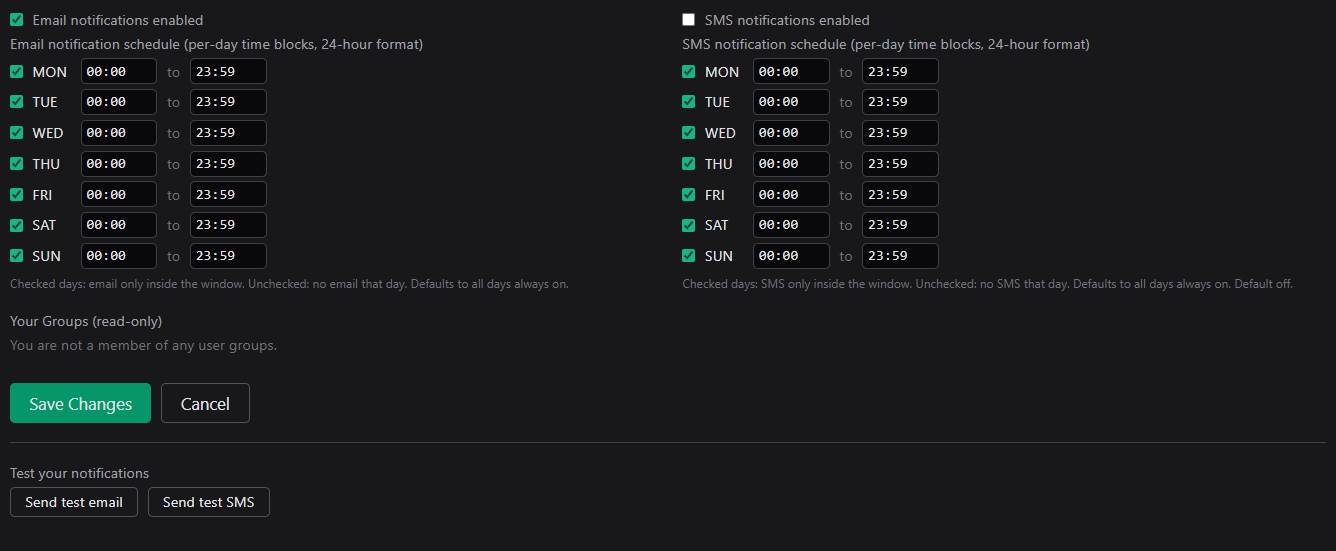
Email and SMS notification switches and schedules on Your Profile, with the test buttons below.