Acknowledging alarms
Who can do this: operators and organization administrators. Viewers can see acknowledgements but cannot place or remove them.
Acknowledging an alarm tells Pulse, and everyone in the notification group, that someone has seen it and is dealing with it. It silences further alarm notifications for that severity while the alarm continues.
What an acknowledgement does
- Stops alarm and repeat notifications for the service while the current severity is at or below the acknowledged severity.
- Sends an Acknowledged notification to the service's notification group, if Send acknowledgements is on for the service (it is by default). See Notifications you receive.
- Shows "Acknowledged by name at time" on the alarm row in Active Alarms (the row is dimmed) and "Acknowledged by name" on the service page. Times are in your profile timezone.
- Records an ACKNOWLEDGED event in the service's Recent Events and an entry in the audit log.
What an acknowledgement does not do
- It does not change the severity or remove the alarm from Active Alarms. The alarm stays listed until the reading recovers.
- It does not stop an escalation. An alarm acknowledged at WARNING that then reaches CRITICAL is notified again as CRITICAL, and can be acknowledged again at CRITICAL.
- It does not stop stale, repeat stale or data recovered notifications. Acknowledging a bad reading says nothing about losing the data feed. Only a mute or downtime silences those.
- It does not stop the Recovered notification.
- It does not carry over to the next alarm. See When acknowledgements are cleared.
Severity scoping
An acknowledgement is placed on the service (not on a single channel) and records the worst severity active on the service at that moment.
| Acknowledged at | Later severity | Notified? |
|---|---|---|
| WARNING | WARNING (continues) | No |
| WARNING | CRITICAL (escalates) | Yes, after the Critical band's Delay |
| CRITICAL | CRITICAL (continues) | No |
| CRITICAL | WARNING (de-escalates) | No, the CRITICAL acknowledgement covers WARNING |
Only the most recent acknowledgement on the service counts. Acknowledging the same severity twice is refused with "Alarm already acknowledged at this severity".
Acknowledge from the dashboard or the service page
- Open the dashboard and find the alarm under Active Alarms, or open the service page.
- Click Acknowledge. There is no confirmation dialog and no comment box.
- The button is replaced by "Acknowledged by your name at time (severity)" and a Remove acknowledgement button. The time in this immediate confirmation is written
YYYY-MM-DD HH:MMin UTC; once the list refreshes (every 15 seconds on the dashboard, or when you reload the service page) it is shown asMon DD, YYYY HH:MM:SSin your profile timezone.
The acknowledgement has no expiry. It lasts until the alarm recovers, someone removes it, or one of the automatic clears below happens.
If you do not have the operator role, the button is not shown. The service page reads "Active alarm — acknowledge requires operator access" instead, and the dashboard row has no button.
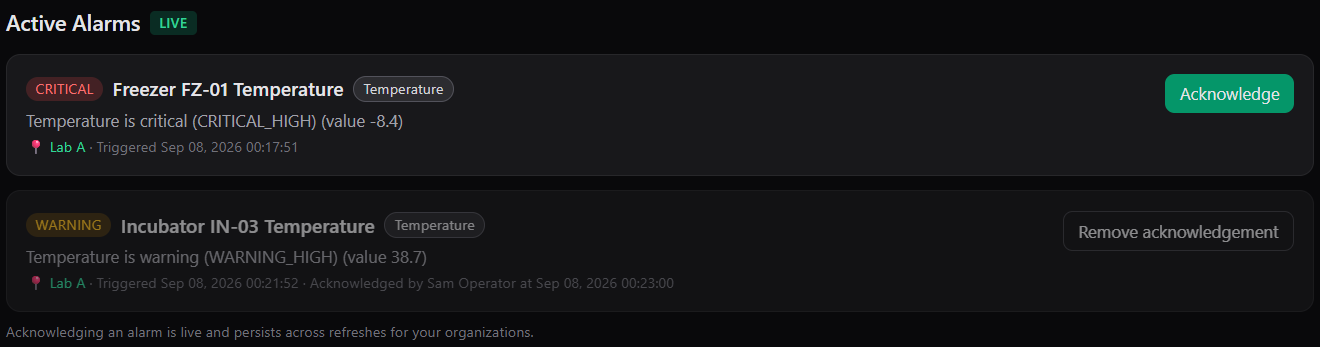
Active Alarms*: an unacknowledged CRITICAL row with Acknowledge*, and a WARNING row that is already acknowledged.
Acknowledge from an email notification
Every alarm and repeat email contains the line Acknowledge this alert: <link>. The link opens the service page in Pulse.
- Click the link. If you are not signed in, the sign-in page opens first and returns you to the service page afterwards.
- Click Acknowledge on the service page.
The email does not acknowledge anything by itself; the acknowledgement is placed when you click the button on the service page.
Acknowledge by SMS reply
Every SMS from Pulse ends with Reply 7KQ4 to acknowledge, where 7KQ4 is that text's own 4-character code. Replying to the text with the code acknowledges the alarm that the text was about, at the severity that the text reported.
Reply format. Send the code on its own or with any other words, for example 7KQ4, ack 7kq4 or ok 7KQ4. Upper and lower case both work. The word "ack" is not required and is not checked; a reply of just "ack" or "ok" without the code does nothing.
What happens.
- Anyone who receives Pulse texts can reply: your phone number must be in Phone (for SMS) on your profile with SMS notifications enabled, and your account must be active. There is no separate list of approved numbers.
- The code must match a text that was sent to your phone number. A code from someone else's text does not work from your phone.
- Replies are read once a minute. The acknowledgement is recorded in your name and appears in Pulse as "Acknowledged by your name". In Recent Events the row reads "by sms-ack:user-N", where N is your user number.
- An SMS acknowledgement expires after 12 hours. If the alarm is still active after that, alarm notifications resume at the next repeat.
- Pulse texts you back
Acknowledged: {svc}. Thank you. (Pulse), where{svc}is the service name, within a minute or two. The Acknowledged notification also goes to the group in the usual way if Send acknowledgements is on. The confirmation text is sent on a best-effort basis: if it does not arrive, check the service page. The acknowledgement stands whether or not the confirmation was delivered. - Codes do not expire, and Pulse does not check whether the alarm is still active. Replying with the code from a Recovered, Stale or Data recovered text, or from an old alarm text, places a 12-hour acknowledgement on that text's service at the severity the text reported, even if the service is NORMAL now. That acknowledgement silences the next alarm at or below that severity. Reply only to the text about the alarm you are dealing with. The code on a test text is not linked to any alarm and does nothing.
When a reply does not work.
| Situation | What you see |
|---|---|
| Your number is no longer on an active Pulse user with SMS notifications enabled (for example SMS was switched off on your profile after the text was sent). | Reply: Sorry, this number isn't registered for acknowledgements. |
| The code has a typo, or does not match any text sent to your number. | No reply. Nothing is acknowledged. |
| The text contains no 4-character code at all. | No reply. Nothing is acknowledged. |
| The code came from a test text. | No reply. Nothing is acknowledged. |
Codes are made of the digits 2 to 9 and capital letters, and never contain 0, 1, I, O or U, so a character that looks like a zero is always the letter O and never appears, and a character that looks like a one is never used.
Status queries by SMS
You can also text Pulse to ask for a status. Pulse answers only for services whose notification group you belong to; anything else gets no reply.
| You send | Pulse replies |
|---|---|
status 42 (or stat 42, or s 42, where 42 is the service number from the service page address) |
The service's current readings, for example 42 Incubator 3: temp_1 37.0 co2 5.1 rh 90. Battery and setpoint channels are left out. If no readings are available, the state instead: 42 Incubator 3: CRIT 9.1 stale. |
status or status all |
A count of your services by state: C:1 W:0 N:12 S:2 (critical, warning, normal, stale). |
Remove an acknowledgement
- On the dashboard row or the service page, click Remove acknowledgement. There is no confirmation dialog.
- The Acknowledge button returns.
Removing an acknowledgement removes the most recent one only. Alarm notifications resume at the next repeat interval; nobody is notified that the acknowledgement was removed. An UNACKNOWLEDGED event is recorded in Recent Events. If there is nothing to remove, Pulse replies "No acknowledgement to remove".
When acknowledgements are cleared automatically
All acknowledgements on a service are removed, without any notification, when:
- The service recovers (returns to NORMAL). The next alarm is a new episode and is notified in full.
- Data resumes after a stale period, even if the reading is still out of limits. A sensor that goes quiet and comes back still alarming is notified again.
- An organization administrator saves the service's alarm limits, or applies an AI recommendation. Pulse re-evaluates the service and treats the result as a new alarm.
Errors
| Message | Meaning |
|---|---|
| "No active alarm to acknowledge for this service" | The service is not in WARNING or CRITICAL. A stale service with no value alarm cannot be acknowledged; use a mute to silence stale notifications. |
| "Alarm already acknowledged at this severity" | An acknowledgement at this severity is already in place. |
| "No acknowledgement to remove" | There is no acknowledgement on the service. |
| "Operator role or higher required for this action" | Your role in this organization is viewer. Contact your organization administrator. |
| "Not authorized for this service" | The service belongs to an organization you are not a member of. |