How alarms work
Who can do this: viewers, operators and organization administrators can see alarm states. Organization administrators set the limits that produce them (see Alarm limits and policies).
Pulse watches each service: a monitor for one or more channels (temperature, CO2, humidity, and so on) of a device. For each channel, your organization administrator can set up to four bands: Critical Low, Warning Low, Warning High and Critical High. Each band has a limit value, a Sustained (min) value and a Delay (min) value.
This page explains how a reading becomes an alarm, how an alarm recovers, and what stale means. For what happens after that, see Notifications you receive, Acknowledging alarms and Muting and downtimes.
The alarm states
A service channel is always in exactly one severity: NORMAL, WARNING or CRITICAL. On top of that severity it can also be stale, which means no data has arrived recently. Stale is a separate flag, not a fourth severity: a channel can be stale while still recorded as CRITICAL underneath.
| State | What it means | How it appears |
|---|---|---|
| Normal | The latest reading is within every limit. | OK badge on the dashboard card. No row in Active Alarms. |
| Pending | The latest reading is outside a limit, but has not been outside it for that band's Sustained (min) yet. | Still shown as OK. Nothing is recorded. |
| Warning | The reading has been continuously outside a Warning limit for the band's Sustained minutes. | WARNING badge. A row in Active Alarms with a message such as "Temperature is warning (WARNING_HIGH) (value 8.4)". |
| Critical | The reading has been continuously outside a Critical limit for the band's Sustained minutes. | CRITICAL badge. A row in Active Alarms with a message such as "Temperature is critical (CRITICAL_HIGH) (value 9.1)". |
| Stale | No reading has arrived for longer than the service's stale threshold: twice the device's uplink interval when one has been set from Pulse, otherwise Stale after (minutes) (see Stale: when data stops). The last severity is kept underneath. | STALE badge. A row in Active Alarms reading "No data since … UTC". On the service page, a "⚠ STALE — no data since …" banner. |
| Recovered | A reading came back within all limits, or data resumed after a stale period. | The badge returns to OK (or to the underlying severity when data resumes). The row leaves Active Alarms. |
stateDiagram-v2
    direction LR
    [*] --> Normal
    Normal --> Pending : reading outside a limit
    Pending --> Normal : reading back within limits (nothing recorded)
    Pending --> Warning : outside a Warning limit for Sustained minutes
    Pending --> Critical : outside a Critical limit for Sustained minutes
    Warning --> Critical : next reading outside a Critical limit
    Critical --> Warning : next reading inside the Critical limit, outside a Warning limit
    Warning --> Normal : one reading within limits
    Critical --> Normal : one reading within limits
    note right of Pending
        Pending is displayed as OK.
        Stale is a separate flag that can
        apply in any state. It is set when
        no data arrives for the service's
        stale threshold (2 x uplink interval,
        or Stale after) and cleared by the
        next reading.
    end note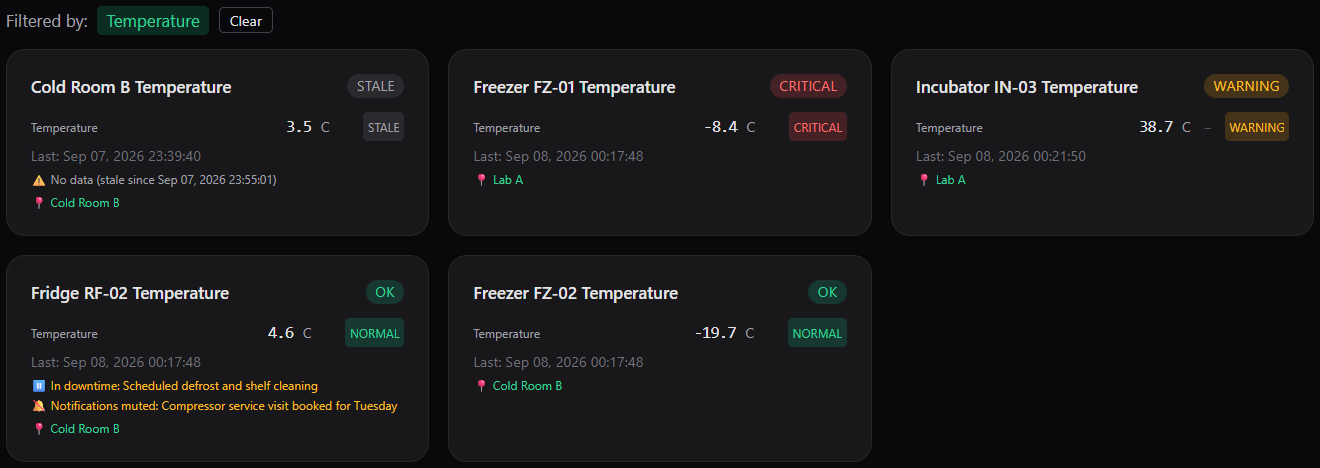
Dashboard cards showing the STALE, CRITICAL, WARNING and OK badges.
Which band applies
- A reading is outside a band when it is below the band's low limit or above its high limit. A reading exactly equal to a limit is within limits.
- If a reading is outside both a Warning and a Critical limit, the Critical band applies.
- A band can have a high limit only or a low limit only. A band with no limit is not used.
From reading to notification: the timing chain
Two timers control an alarm. They belong to different stages and add together; they are never counted twice.
- Sustained (min) decides when the alarm is raised. The reading must be outside the limit continuously for this many minutes, counted from the first out-of-limit reading. If a single reading comes back within limits before the time is up, the timer resets and nothing is recorded. A Sustained value of 0 raises the alarm on the first out-of-limit reading.
- Pulse checks pending channels once a minute. The alarm is raised within one minute after the Sustained time elapses, even if no new reading has arrived in the meantime. A pending channel that becomes stale is not raised until data resumes.
- The alarm is raised. The badge changes, the channel appears in Active Alarms with its "Triggered" time, and an ALARM event is recorded in the service's Recent Events.
- Delay (min) decides when people are told. The first notification is held for this many minutes after the alarm is raised.
- Notification. On the next one-minute check after the delay, Pulse sends the alarm notification, unless something suppresses it. See Notifications you receive.
Time from the first out-of-limit reading to the first notification is therefore Sustained + Delay, plus up to about two minutes for the once-a-minute checks.
Sustained versus Delay
Use Sustained to ignore short excursions such as a door being opened: an excursion shorter than the Sustained time is never recorded and never shows in history. Use Delay to give people on site time to fix a real problem before anyone is notified: the alarm is recorded and visible in Pulse straight away, but the message is held back.
While a channel is pending, the timer keeps running from the first out-of-limit reading even if readings move between the Warning and Critical bands. For example, with a Warning band Sustained of 5 minutes and a Critical band Sustained of 10 minutes, a channel that is outside the Warning limit for 6 minutes and then crosses the Critical limit is raised as CRITICAL 4 minutes later, not 10.
Escalation and de-escalation
Once an alarm is raised, Sustained no longer applies. The severity follows the readings immediately:
- WARNING to CRITICAL: the next reading outside the Critical limit changes the severity to CRITICAL. A new ALARM event is recorded, the "Triggered" time is reset, and the group is notified again as CRITICAL after the Critical band's Delay. An acknowledgement placed at WARNING does not cover this escalation; see Acknowledging alarms.
- CRITICAL to WARNING: the next reading back inside the Critical limit but still outside the Warning limit changes the severity to WARNING. This is also recorded as an ALARM event, the "Triggered" time is reset, and the group is notified again as WARNING after the Warning band's Delay.
Recovery
A single reading within all limits recovers the alarm. The severity returns to NORMAL, a CLEAR event is recorded, the channel leaves Active Alarms, and any acknowledgement on the service is cleared. There is no recovery margin and no recovery delay: Pulse does not wait for the reading to move a certain distance back inside the limit, and it does not wait for several good readings.
Because of this, the next out-of-limit reading starts a new episode. It gets its own Sustained timer, its own ALARM event, its own Delay, its own notification and its own recovery. A reading that sits near a limit and moves a little either way therefore produces a series of short alarms.
Readings that hover near a limit
If a channel normally runs close to one of its limits, expect repeated alarm and recovery notifications. Either move the limit further from the normal operating range or increase the band's Sustained (min) so that brief crossings are not raised. An acknowledgement does not help here, because each recovery clears it.
Stale: when data stops
Pulse checks once a minute whether the last reading for each channel is older than the service's stale threshold. When it is, the channel is marked stale within one minute, a STALE event is recorded, and the badge shows STALE. The severity underneath is kept: a CRITICAL channel that goes stale is still listed as CRITICAL in Active Alarms with the stale marker, but it does not send alarm or repeat notifications while it is stale. If the service has system notifications enabled, a STALE notification is sent instead (see Stale and data recovered).
The stale threshold
The threshold depends on whether Pulse knows how often the device reports. It knows once an organization administrator has sent the device a Set uplink interval command; the value is shown in the Uplink (min) column of the Devices page.
| Uplink (min) on the device | Stale threshold for every service on an asset linked to that device |
|---|---|
| A value (an uplink interval has been sent from Pulse) | Twice the uplink interval. A device set to report every 10 minutes is marked stale when no reading has arrived for 20 minutes, that is roughly after it has missed two reports in a row. The service's Stale after (minutes) setting is not used. Shortening the interval therefore also makes stale detection faster. |
| — (no uplink interval has ever been sent) | The service's Stale after (minutes) setting (default 15). |
Setting Stale after (minutes) to 0 turns stale detection off for the service entirely, whether or not the device has an uplink interval.
Devices still on their factory reporting interval
Until you send a device an uplink interval, Pulse judges its services on Stale after (minutes) alone. If that value is shorter than, or close to, the interval at which the device actually reports, the channel flips between STALE and OK around every reading, and each flip can send a DATA RECOVERED and then a STALE notification. Either send the device an uplink interval once, so that the threshold follows it automatically, or set Stale after to at least two to three times the factory interval. The default of 15 minutes suits a device that reports about every 5 minutes.
The uplink interval is sent to the device unconfirmed. Pulse uses twice the value you sent from the moment you send it, so if the device has not applied the new interval yet, check Last Seen on the Devices page rather than assuming the threshold matches.
When data resumes, the next reading clears the stale flag, a RECOVERED event is recorded and, if system notifications are enabled, a DATA RECOVERED notification is sent. Any acknowledgement on the service is cleared at this point. If the first reading after the gap is out of limits, the time the channel was blind counts toward the Sustained timer: a gap longer than the Sustained time raises the alarm on that first reading.
Stale detection is per service, so all channels of a service share the same threshold. Downtime does not pause stale detection. The uplink-based threshold applies to missing data only; the freshness check for a companion setpoint (next section) always uses Stale after (minutes).
Companion stale (percentage-of-setpoint limits)
A channel whose limits are set as a percentage deviation from a setpoint depends on a companion setpoint channel (and, when configured, a state channel) from the same device. If the setpoint has not arrived within the service's Stale after minutes, is missing, or is 0, the channel is marked stale even though it is still reporting values. Its severity and any running Sustained timer are kept, and the stale flag clears as soon as a usable setpoint arrives. A state value of 0 (equipment off) forces the channel to NORMAL rather than stale.
Episodes and Recent Events
An episode is one continuous period in which a channel is in WARNING or CRITICAL. It starts when the alarm is raised, may contain escalations and de-escalations, and ends at recovery. Every episode is notified and recovered on its own.
The service page shows the last eight events for the service under Recent Events. Each row shows the event type, the severity change in brackets (for example "(NORMAL → CRITICAL)"), the value at the time, the time in your profile timezone, and who or what recorded it ("by …").
| Event | Recorded when | Severity shown |
|---|---|---|
| ALARM | The alarm is raised, and again on every escalation or de-escalation. | previous → new, for example NORMAL → WARNING or WARNING → CRITICAL. |
| ALARM (by pulse-ai-notify) | The alarm notification is sent to the group. This second ALARM row means "a notification went out". | NORMAL → the notified severity. |
| CLEAR | The channel recovers. | previous → NORMAL. |
| STALE | No data for the stale threshold, or a companion setpoint is unavailable. | The last known severity on both sides. |
| RECOVERED | Data resumes after a stale period. | The last known severity → the severity after the first new reading. Both sides are the same unless that reading changed the severity, in which case an ALARM or CLEAR row with the same change is recorded at the same moment. |
| ACKNOWLEDGED | Someone acknowledges the alarm, from Pulse or by SMS reply. | The acknowledged severity on both sides. |
| UNACKNOWLEDGED | Someone removes an acknowledgement. | — |
Things that do not appear in Recent Events: excursions shorter than the Sustained time, mutes, and downtimes. Mutes and downtimes are shown on the service page itself and in the audit log.
Organization administrators can see the complete, filterable history for all services on the Alarm history and audit log page.
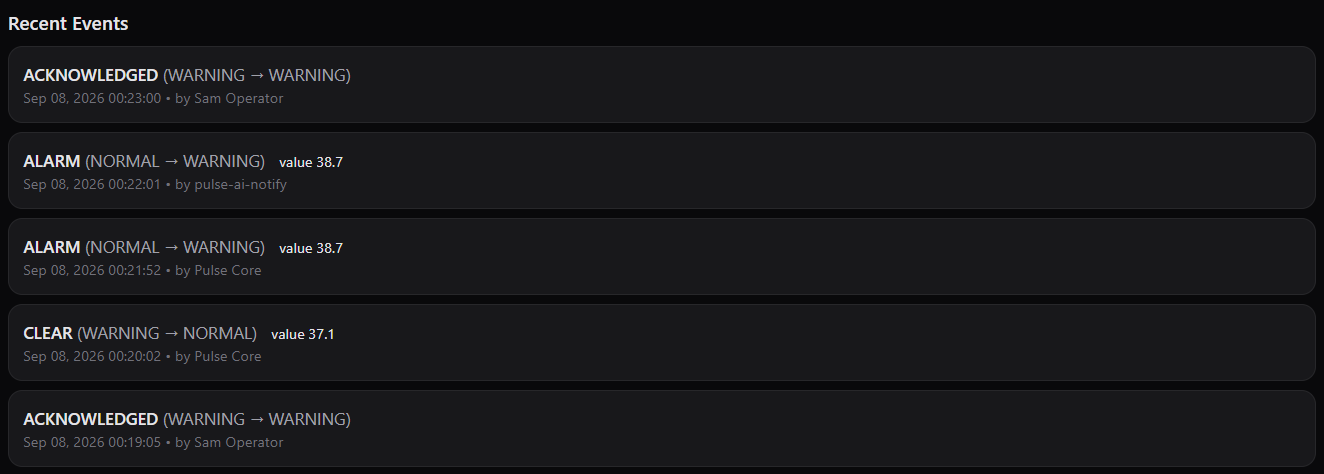
Recent Events on a service page: ACKNOWLEDGED, ALARM and CLEAR rows, newest first.
Downtime and limit changes
- A downtime does not pause evaluation. Alarms are still raised and recorded during the window; they are hidden from Active Alarms and not notified until the window ends.
- When an organization administrator saves new limits, Pulse re-evaluates the service immediately against the last reading it received. Tightening a limit can raise an alarm straight away (notified after the band's Delay); loosening one can recover an active alarm. Saving limits also clears any acknowledgement on the service. See Alarm limits and policies.